Feature by feature
| Capability | KyoubeAI | ChatGPT dots |
|---|---|---|
| Multiplayer environment | ||
| One sign-in for the whole company | Yes | PartialBusiness Premium and Enterprise |
| People and agents in one shared workspace | Yes | PartialOnly its owner directs it |
| Tasks handed between people and agents | Yes | No |
| Governance | ||
| Companies kept apart at the database level | Yes | PartialWorkspace scoping, no shared database |
| An audit trail for every change | Yes | PartialCompliance API, coverage to confirm |
| Human approval before risky actions | YesBy admin policy | Yes |
| Data and apps | ||
| A database the agents design and populate | Yes | No |
| Apps the agents build and publish | Yes | PartialSoftware on its own cloud computer |
| Apps respect each viewer's permissions | Yes | No |
| Hosting, models and licence | ||
| Runs on your own server | Yes | PartialOne connected computer, not the dot |
| Bring your own model providers | Yes | No |
| Choose the agent runtime | Yes | No |
| Source code you can read | YesBSL 1.1 | No |
| Trade-offs | ||
| Nothing to host or maintain | PartialHosted plan in early access | Yes |
| On a phone as well as in a browser | No | PartialDesktop to create; mobile app once updated |
Whether you can get one yet
Dots are rolling out gradually, and OpenAI says you may not see one immediately even on an eligible plan. Three tiers qualify: Pro 100, Pro 200 and Pro 500, for users over 18 and only outside the European Economic Area, the United Kingdom and Switzerland; Business Premium, rolling out worldwide; and Enterprise, worldwide but off until a workspace administrator enables it.
If you are reading this from London or Dublin, that first exclusion is most of the answer. The individual plans that carry dots are not open to you yet, and the route in is a Business Premium or Enterprise workspace. Either way setup is desktop-only — the ChatGPT desktop app or a desktop browser — and you can use the dot from the mobile app once the supporting update reaches you. Mobile web is not supported. Microsoft Teams access is an invite-only alpha.
Where the line falls
OpenAI's own administrator guide gives the one-sentence definition: a dot is "a personal agent in ChatGPT with its own cloud computer". Every design decision follows from the word personal. A dot belongs to one account. Its standing instructions live in that person's Settings under Personalization. Its private notes are its own. And in Slack, where a dot is most visible to colleagues, the documentation is explicit: only the owner can direct it, and messages from other people do not start work.
That is a real capability, and it is not the same capability as a second worker. One person gets more done. What the organisation gets is an account-owned delegate rather than a shared company role. Administrators are not blind to it — they grant or revoke dots access, decide which apps, channels and computers it can reach, and pull Compliance API records of a member's messages and their dot's replies, and anyone in a Slack conversation can see what it posts there. But seeing a delegate is not the same as being able to direct one, and the dot's instructions, notes and queue stay attached to the account that made it.

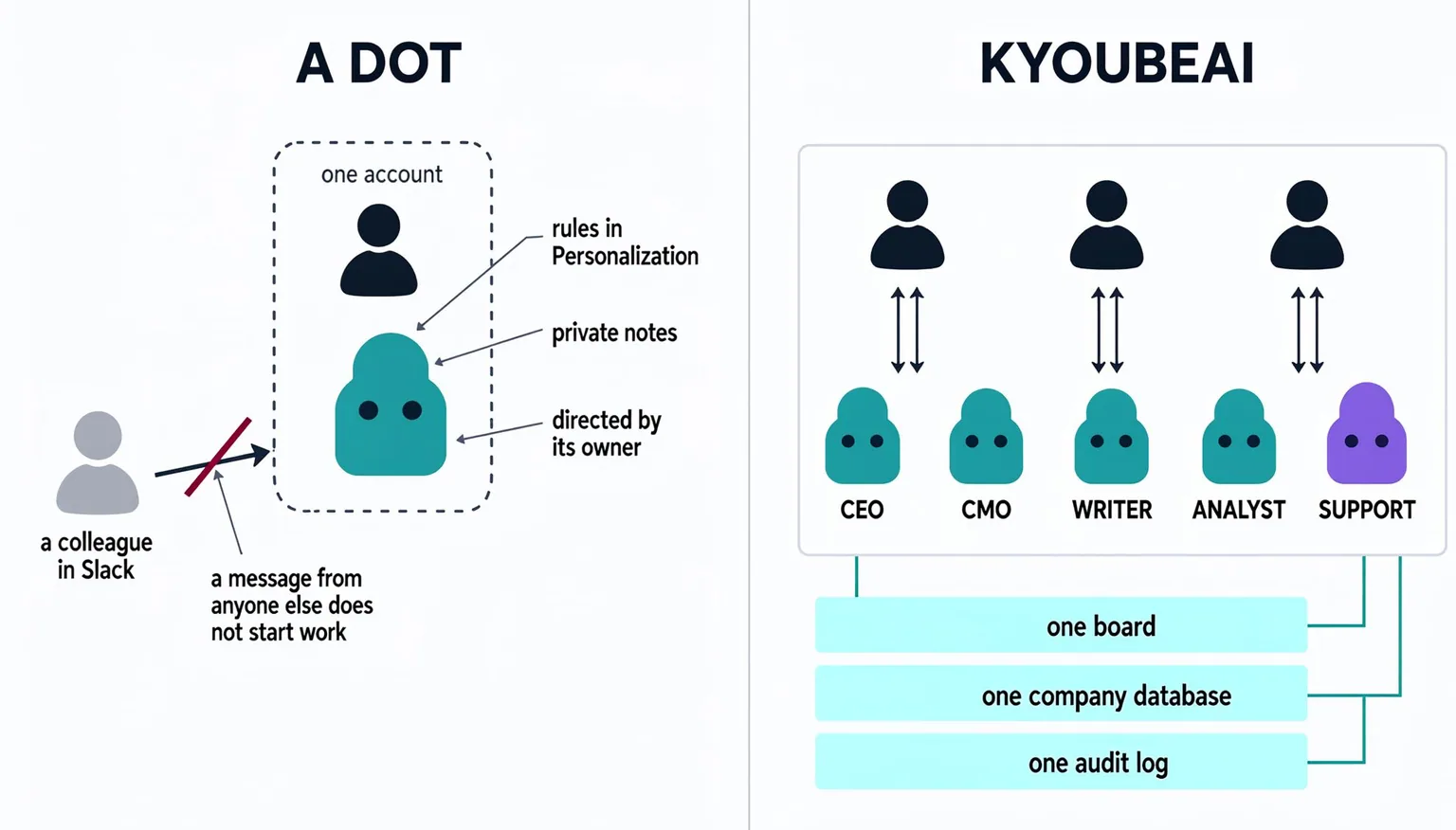
KyoubeAI inverts the unit. An AI employee is created by the company, not by a person: it has a role in the org chart, written instructions anyone with permission can read, a task board shared with the humans, a budget, and a scoped grant on the company's own Postgres database. A task can be handed from a person to an agent, from an agent to a person, or from one agent to another, because the board is the same object for all of them. That inversion is the whole category, and why an AI OS is important sets it out at more length.
Two consequences worth naming, because they decide procurement more often than any feature does.
Access is priced per person. A dot rides on an eligible ChatGPT seat: Pro at US$100, US$200 or US$500 a month, Business Premium, or Enterprise. Ten people who each want their own always-on agent need ten eligible seats. To be fair to the design, one seat buys more than one thread — the vendor guide says a dot divides work among background agents that run in parallel and report back to it, so a single dot can hold several jobs at once. But the thing you buy a licence for is still the person. KyoubeAI counts human accounts only: AI employees never count as users, however many you run, and the per-person figures are on our pricing page.
Offboarding is a different shape. OpenAI's admin guide tells administrators to review a dot's saved memories and reset options when handling sensitive data or offboarding, and notes that disconnecting an app does not delete information the dot already obtained. Deleting a dot does not undo changes it has already made in connected apps or recall messages it has already sent. In KyoubeAI what leaves with the person is the person: the agent, its instructions, its tasks and its audit history stay, and you reassign rather than reconstruct. Connected accounts and live sessions still need their own cleanup either way — owning the agent changes who can direct it, not what an external service remembers.
The two products in brief
| Criterion | KyoubeAI | ChatGPT dots |
|---|---|---|
| What it is | A self-hosted AI operating system where a company's people and AI agents work together. | OpenAI's always-on personal agent in ChatGPT, powered by GPT-6 Astra, with its own cloud computer and browser. It keeps working between conversations, divides work among background agents, and brings decisions back to its owner. |
| Built for | Organisations that want agents working under their own roles and approvals, with someone who can run Docker. | One person on an eligible ChatGPT plan who wants a standing delegate across their own apps, files and recurring work. |
| Where it runs | Your own server, from one Docker Compose file. It needs 4 GB of RAM on amd64 or arm64. | OpenAI's cloud, on a computer and browser the dot keeps between sessions. It can also drive one connected personal computer, which must be online with the ChatGPT app open. |
| Price | Free for up to five users on your own server, then US$39 per user a month self-hosted, billed annually, or US$99 per user a month hosted with a five-seat minimum. Enterprise terms are custom. You pay your model providers for usage. | An eligible plan: ChatGPT Pro at US$100, US$200 or US$500 a month, Business Premium, or Enterprise. OpenAI's pricing page lists the Pro tiers and does not publish a Business Premium price. Conversations with a dot do not count against usage limits; the Work and Codex tasks it starts do. |
What it is
- KyoubeAI
- A self-hosted AI operating system where a company's people and AI agents work together.
- ChatGPT dots
- OpenAI's always-on personal agent in ChatGPT, powered by GPT-6 Astra, with its own cloud computer and browser. It keeps working between conversations, divides work among background agents, and brings decisions back to its owner.
Built for
- KyoubeAI
- Organisations that want agents working under their own roles and approvals, with someone who can run Docker.
- ChatGPT dots
- One person on an eligible ChatGPT plan who wants a standing delegate across their own apps, files and recurring work.
Where it runs
- KyoubeAI
- Your own server, from one Docker Compose file. It needs 4 GB of RAM on amd64 or arm64.
- ChatGPT dots
- OpenAI's cloud, on a computer and browser the dot keeps between sessions. It can also drive one connected personal computer, which must be online with the ChatGPT app open.
Price
- KyoubeAI
- Free for up to five users on your own server, then US$39 per user a month self-hosted, billed annually, or US$99 per user a month hosted with a five-seat minimum. Enterprise terms are custom. You pay your model providers for usage.
- ChatGPT dots
- An eligible plan: ChatGPT Pro at US$100, US$200 or US$500 a month, Business Premium, or Enterprise. OpenAI's pricing page lists the Pro tiers and does not publish a Business Premium price. Conversations with a dot do not count against usage limits; the Work and Codex tasks it starts do.
Which should you choose?
Choose ChatGPT dots if
- You want one standing delegate for your own work, with nothing to install and nothing to host
- You are outside the EEA, the UK and Switzerland on ChatGPT Pro, or your workspace runs Business Premium or Enterprise and has turned dots on
- You need it reachable where you already are: ChatGPT on desktop, the mobile app once the update reaches you, a voice call, or Slack
- The work needs a browser that keeps its sessions, with a private sign-in form and a take-over button when a site blocks it
Choose KyoubeAI if
- The agents are the company's, not one person's: a role in the org chart, readable instructions, and work that survives the person who started it
- Tasks have to move in both directions between people and agents on one shared board
- The records agents produce must live in a Postgres database on servers you run, with every change audited
- You want more agents than you have people, without paying a seat for each one
- You want to pick the model providers and the agent runtime yourself
Where KyoubeAI is ahead
An org chart, not an inbox
AI employees hold roles, report to someone, and share one board with the people they work with, so any task can move either way. A dot answers to the account that created it; in Slack, only its owner can direct it, and messages from other people do not start work.
Company data in your own database
Agents design and fill a Postgres database you host, and every change is written to the audit log. A dot keeps files on its cloud computer and private notes you cannot inspect or delete individually; OpenAI's admin guide points administrators at Compliance API records for user messages and dots' replies, and says to confirm record coverage before relying on it for an audit.
The licence counts people, not agents
KyoubeAI charges for the humans who can sign in; AI employees never count, however many you run. Dots are priced the other way: every person who wants one needs an eligible ChatGPT seat of their own.

Run KyoubeAI on your own server.
It is free to run at any size. You need a machine with Docker and keys for the model providers you use.
- Clone
git clone https://github.com/jknigel/KyoubeAI.git && cd KyoubeAI - Configure
cp .env.example .env - Run
docker compose up -d --build
Sources
Every claim about ChatGPT dots comes from these pages, read on the dates shown.
Show all 11 sources
- Meet dots (ChatGPT docs) (opens in a new tab) · read 1 Oct 2026
- Get started with your dot (ChatGPT docs) (opens in a new tab) · read 1 Oct 2026
- Tasks and memory (ChatGPT docs) (opens in a new tab) · read 1 Oct 2026
- Connect computers and apps to your dot (ChatGPT docs) (opens in a new tab) · read 1 Oct 2026
- Control your dot (ChatGPT docs) (opens in a new tab) · read 1 Oct 2026
- Message your dot (ChatGPT docs) (opens in a new tab) · read 1 Oct 2026
- Manage dots permissions and capabilities (ChatGPT docs) (opens in a new tab) · read 1 Oct 2026
- Local computer access for Work Cloud and dots (ChatGPT docs) (opens in a new tab) · read 1 Oct 2026
- Plugins (ChatGPT docs) (opens in a new tab) · read 1 Oct 2026
- Compliance API and audit events (ChatGPT docs) (opens in a new tab) · read 1 Oct 2026
- Pricing (ChatGPT docs) (opens in a new tab) · read 1 Oct 2026
Spotted a change? Open an issue (opens in a new tab).