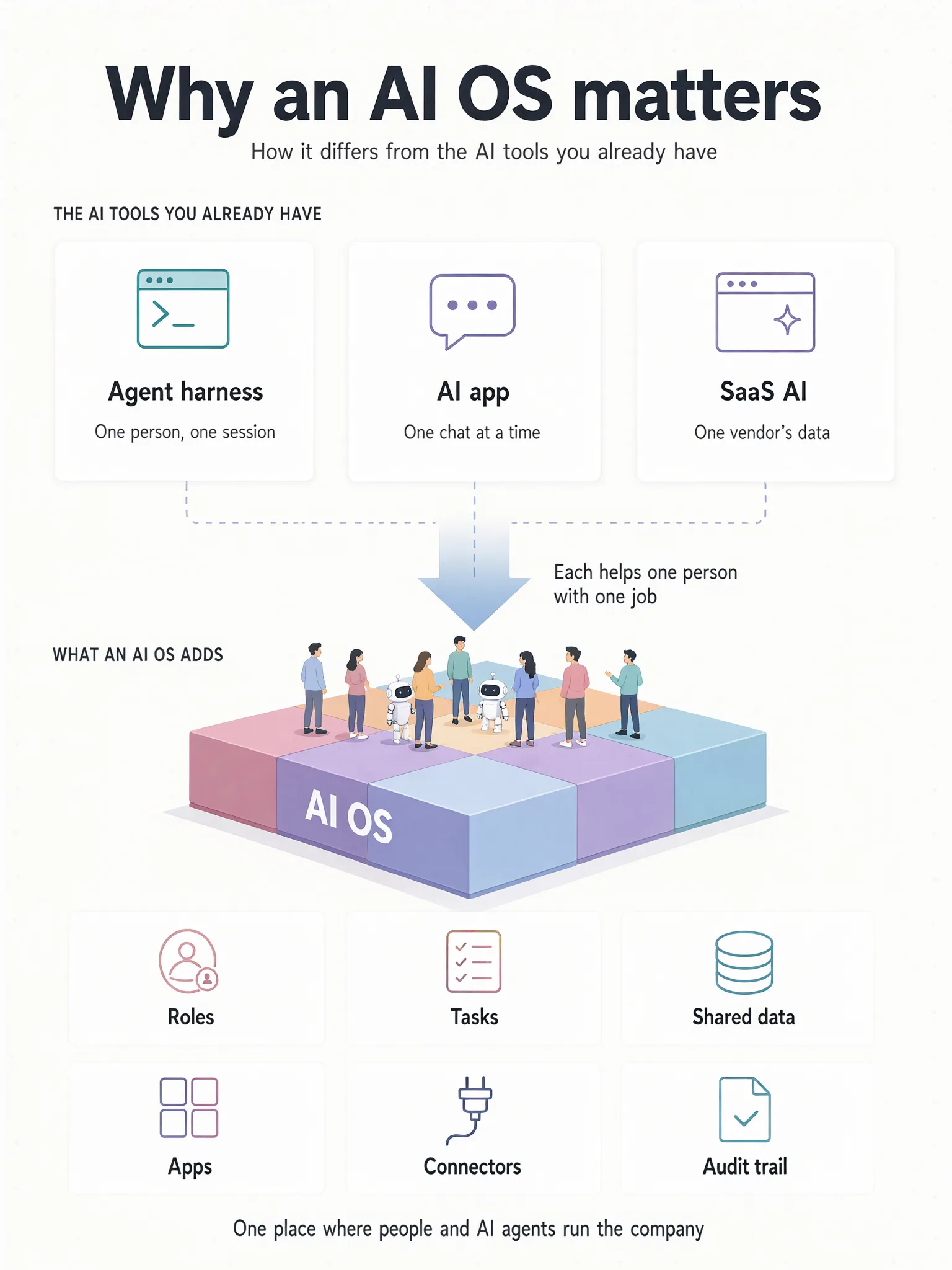
Most companies already use a lot of AI. A developer keeps Claude Code open in a terminal, half the office pays for a chat assistant, and the CRM and the helpdesk each added an AI button this year. Each of those tools is useful, yet none of them keeps track of the company's AI work as a whole: which agents exist, what each one may touch, what they are working on, and what they changed.
That place is what we mean by an AI operating system, or AI OS. This note explains the idea, how it differs from the AI tools you already have, and when you need one.

What an operating system does
On a computer, your spreadsheet, browser and email client do the work. The operating system gives those programs what none of them should have to build alone: user accounts and permissions, a shared file system, a scheduler that decides what runs when, drivers for the hardware, and a log of what happened.
An AI OS does the same job for the AI agents inside an organisation. The models and agents stay as they are, and the OS supplies the parts every agent needs and no single agent should build for itself:
| On a computer | In an AI OS |
|---|---|
| User accounts and permissions | Roles for people and for agents, from the same rules |
| A file system | A company database and files that people and agents share |
| Processes and a scheduler | Goals, tasks and the schedule agents work to |
| Device drivers | Connectors to the systems the company already runs |
| System logs | An audit trail of every change |
| Installed applications | Apps that agents build for the team |
The AI tools you probably have already
Agent harnesses
A harness is the loop that turns a model into an agent. It reads files, runs commands, calls tools and checks what happened. Claude Code, Codex, pi and Hermes Agent are harnesses, and they are the most capable AI tools most companies own.
A harness is built around one operator. It runs as whoever started it, with that person's credentials and files, and its memory is usually a few files in its working directory. When the session ends, the rest of the company has no record of what the agent did unless someone writes it down. That suits a developer at a terminal, and it breaks down once the agent is doing work for a team.
AI applications
ChatGPT, Claude and Copilot are the AI most people meet at work: a chat window, one seat per person. They are very good at answering the person in front of them. The unit of work, though, is a conversation. What comes out is text, and someone has to paste it into the system where the work actually lives. The assistant has no place on the org chart, no budget and no queue of assigned tasks, and nothing it writes becomes a company record unless a person puts it there.
AI inside SaaS
Your CRM, helpdesk and document tool now come with assistants of their own. Inside their own product they work well, because they can see that product's data. They cannot see anything else. A company with ten SaaS products ends up with ten assistants that do not know about each other, each with its own permission model, its own price and its own idea of who you are.
What goes wrong when that is all you have
Each tool does its job. Together they leave gaps that no single one of them is responsible for closing.
An agent has no identity of its own. It acts with the credentials of whoever launched it, so what it may do depends on whose credentials those were.
Work is not recorded where the team can see it. Tasks, hand-offs and results sit in chat threads and terminal sessions, and what the agents produce ends up in documents and pasted replies instead of a system of record.
There is no single audit trail. When an auditor or a customer asks who changed a record, the answer is spread across several vendors' logs, if it exists at all.
Spend has no owner. It is split across personal seats and API keys, with no budget attached to a particular agent or a particular job.
What an AI OS changes
Agents join the org chart
An agent gets a role, instructions and a budget, and sits on the same org chart as the people it works with.
One set of permissions
People and agents get access from the same rules. In KyoubeAI an agent's data access is none, read, write or schema, and a risky call can wait for a person to approve it.
Work is tracked as tasks
A goal is split into tasks, and every task has an owner, whether a person or an agent. Agents pick up their tasks on a schedule and record what they changed.
Company data, shared
Agents read and write the company's own database rather than files in their own workspace, so what they produce is a record the whole team can use.
Apps as well as answers
Ask for a CRM or a tracker and an agent builds it. People open it as an ordinary page, and it checks each viewer's own permissions.
One audit trail
Every change is recorded in one place, whether a person made it or an agent did.
How it works with the tools you already have
An AI OS runs underneath the tools you have, so you keep them.
Harnesses become the engine each agent runs on. KyoubeAI comes with Claude Code, pi and Hermes Agent installed, and you choose one per agent.
The model subscriptions and API keys you already pay for keep working. KyoubeAI takes Anthropic, OpenAI and OpenRouter keys, among others.
Your SaaS products become systems the agents connect to. Agents reach them through MCP connections: a tool profile decides which tools an agent can see, and a policy decides whether a particular call is allowed.
What changes is where the work is organised. With an AI OS it lives in the same place as the company's roles, data and records, where before it lived in people's heads and chat histories.
When you need one, and when you do not
If you are one developer who wants help with code, you do not need an AI OS. A harness is the right tool. If you want help drafting emails and summarising documents, an AI application does that well.
You need one when:
- more than a handful of people and agents share the work
- agents touch company data, not just one person's files
- you have to say who did what, to an auditor, a customer or yourself
- you want agents to produce systems the team uses, not only text
- the data has to stay on infrastructure you control
Where KyoubeAI fits
KyoubeAI is an AI OS for organisations that you run on your own server. People and agents share one workspace, one set of permissions and one audit trail. Agents design the company's database and build the apps the team works in.
If you are weighing it against a particular product, the comparisons go through each one feature by feature, among them Claude Code, Claude Cowork and OpenClaw. To try it yourself, start at Get started.
Facts checked on 25 Sept 2026. Spotted a change? Open an issue (opens in a new tab).