An agent that prepares tomorrow's meeting while you finish today's work is an appealing idea. Claude Duet, OpenAI Dots and Grok Bot each promise a version of that experience: delegate a task, let the agent work and return when it needs your attention.
Jad M.H's comparison looks at the differences across eight categories, including usage limits, workplace access and learning from a demonstration. His published breakdown gives Duet three category wins, Grok Bot three and Dots two. Those totals need context: he says he did not have Duet access, so its wins were based on published information.
This article uses that breakdown and its corrections, alongside Anthropic's Duet announcement. It is not a KyoubeAI hands-on benchmark of the three products. The useful choice depends on the work you want to delegate and whether you are choosing an assistant for yourself or building a shared way of working for your organisation.
What the comparison says about each agent
The creator's categories offer a shortlist of things to test. They do not establish that one product will perform best on your work.
| Agent | What stands out in the creator's breakdown | What to check before choosing |
|---|---|---|
| Claude Duet | Included preview access on eligible Claude plans, a broad connector ecosystem and documented approval controls | Waitlist eligibility, shared Claude usage limits and the difference between documented capabilities and tested results |
| OpenAI Dots | Connections to the working day through Slack, Teams and Codex, plus favourable introductory usage terms | Your plan, region, current allowances and where delegated work appears |
| Grok Bot | Multiple bots, group handoffs and learning a task from a recording | Current pricing, access to action history and whether a learned skill handles exceptions |
The reviewer's eight-category scorecard

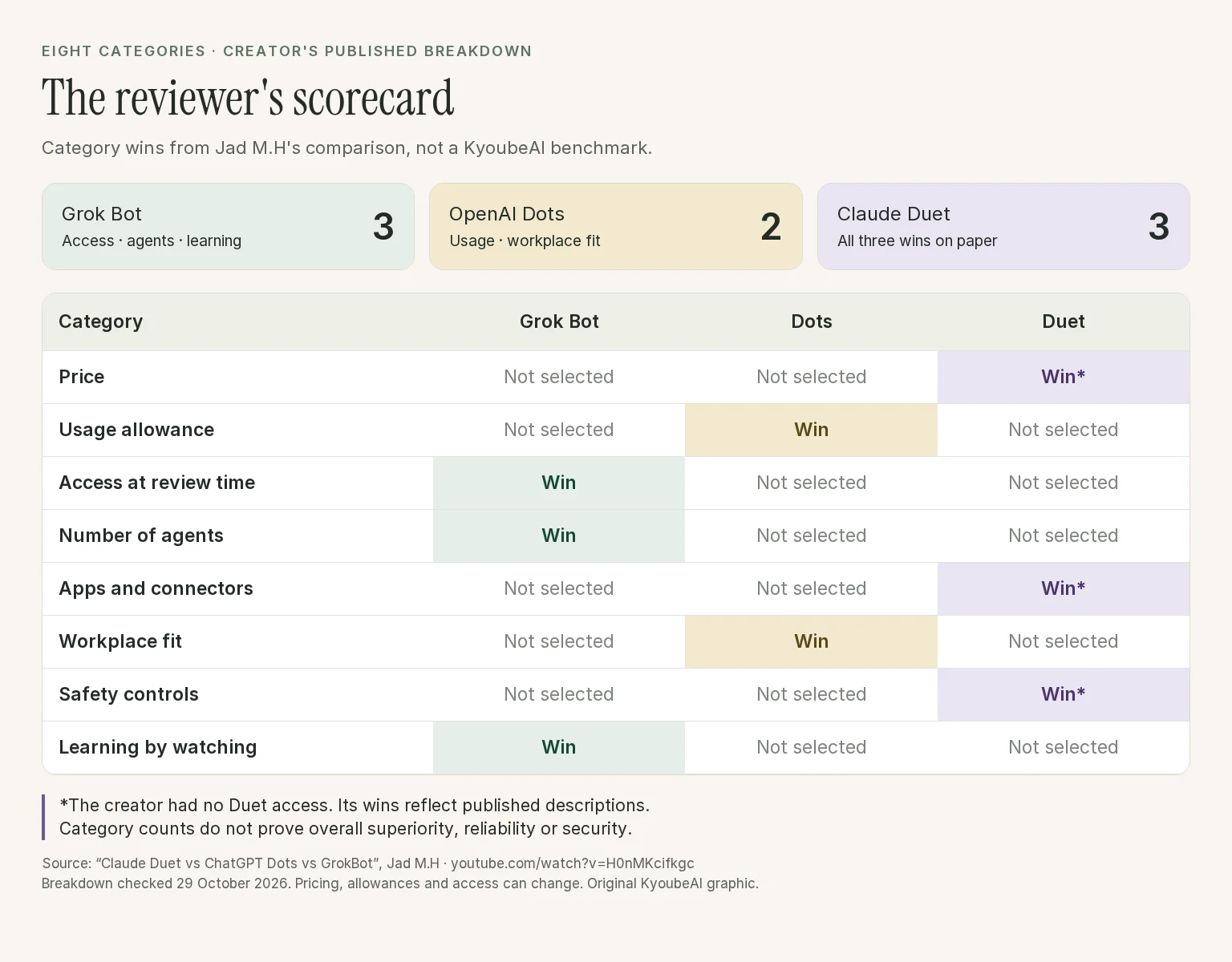
Here is the scorecard in text, so you can read each result without enlarging the graphic:
| Category | Creator's winner | How to interpret the result |
|---|---|---|
| Price | Claude Duet, on paper | Included preview access on eligible Claude plans; current prices still need checking |
| Usage allowance | OpenAI Dots | His assessment of introductory allowances, not a permanent unlimited-use promise |
| Access at review time | Grok Bot | The creator's access assessment at the time, not a guarantee for every region or account |
| Number of agents | Grok Bot | Multiple bots and group handoffs in his breakdown |
| Apps and connectors | Claude Duet, on paper | Published ecosystem breadth, not a count of integrations he personally tested |
| Workplace fit | OpenAI Dots | Slack, Teams and Codex fit in his assessment |
| Safety controls | Claude Duet, on paper | Published safeguards, not a comparative security audit |
| Learning by watching | Grok Bot | Turning a demonstration into a skill, as described by the creator |
The totals are three wins for Grok Bot, two for Dots and three for Duet. These are his judgments, not independently measured scores. A feature count and an approval-policy description do not measure reliability or security under real conditions.
Claude Duet: proactive work with an approval boundary
Anthropic describes Duet as a proactive agent for professionals and small business owners. It carries over memory, skills and connected apps from Claude, sends a morning brief and continues work on a cloud-based virtual machine after you leave.
That makes it worth investigating if your immediate problem is keeping track of work across connected accounts. Anthropic's examples include finding unpaid invoices, drafting sales follow-ups and preparing agreements. These are vendor-described capabilities, not workflows we have independently reproduced.
Anthropic's published demo shows what prepared work can look like. The task queue lists a Series A deck and a meeting brief as ready for review, while other tasks need input or are still working.

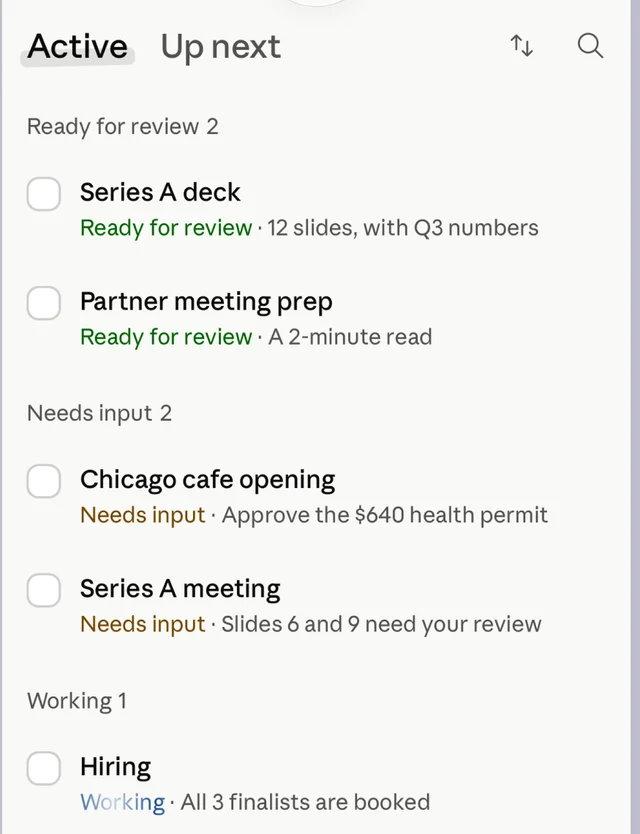
Its approval boundary deserves attention. Anthropic says Duet can read, draft and prepare work independently, but waits for approval before sending messages, making payments, signing documents or deleting information. Some actions remain prohibited even with approval, including trading securities and moving money between accounts.

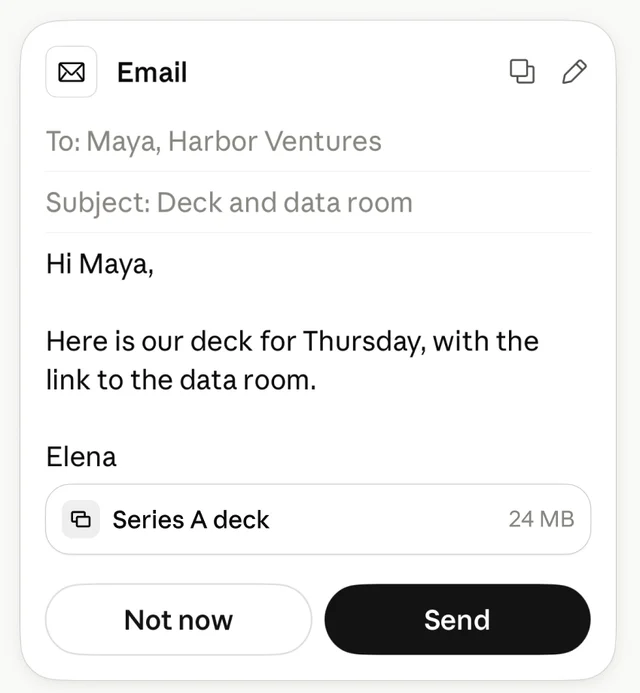
Both screenshots come from Anthropic's safety and privacy article. The distinction between a prepared result and permission to act is visible in the queue and the email card.
There are practical limits. The research preview starts with US Pro and Max subscribers on a waitlist and shares the rest of Claude's usage limits. Connected-account checks happen every few hours to conserve that allowance. If an urgent request must be caught immediately, keep a separate alerting path.
The creator's preference for Duet on safety reflects those published controls. It should not be read as proof that Duet is safer than the alternatives. Our Claude Duet guide covers its access, connected accounts and approval rules in more detail.
OpenAI Dots: evaluate where delegation fits into your day
In the creator's breakdown, Dots stands out for working through Slack and Teams, responding to mentions and starting work in Codex. He also favours its usage terms, describing an introductory allowance and a distinction between talking to a Dot and consuming ChatGPT limits.
Treat those terms as a dated account of the product. Check current eligibility, regional restrictions and background-work allowances before buying a plan for a recurring workflow.
For someone whose work already lives in those tools, the relevant trial is straightforward: assign a bounded task where the discussion already happens, then find the result. Can you see the progress? Does the output land where colleagues expect it? Can another person take over without reconstructing your chat?
Those questions will tell you more about workplace fit than the presence of an integration logo. Our Dots and Muse comparison also examines the distinction between an agent's model and the workspace around it.
Grok Bot: multiple bots and learning from a demonstration
The creator reports that Grok Bot supports more than 50 bots in group chats with handoffs between them. He also singles out its ability to turn a recorded task into a skill. These are the reasons it leads his categories for agent count and learning by watching.
Demonstrating a repetitive task can be easier than writing every instruction. A recording of the successful path, however, leaves questions about what happens when the input changes. Test a missing field, an unexpected screen and an action the bot should stop to ask about.
The creator notes that Grok Bot's recording feature does not capture your spoken explanation. He then introduces his own "Show It Once" skill for Claude Code, which combines a recording with narration. That is his separate tool, not a native capability of all three products.
Pricing also needs care. His description initially names a lower Grok Bot entry price, then corrects the launch requirement to a $200 to $300 monthly plan. We would not use that description alone to quote a current subscription price or recommend a purchase.
Choose a personal agent with one repeatable task
Start with the same small assignment and equivalent access in each product you can use. For example, supply fictional customer enquiries and ask for a summary with draft replies. Leave sending disabled.
Check whether the agent preserves the facts, flags missing information and saves an output you can inspect. Then introduce a correction and see whether it carries through. Include the time you spend checking and repairing the work, along with the allowance it consumes.
The video's categories suggest a starting order: investigate Duet for proactive work within Claude, Dots for continuity with workplace conversations and Codex, and Grok Bot for multiple bots and demonstration-based skills. Your test should decide whether those advantages help with your actual work.
When your people need these capabilities together
A personal agent can help an individual keep up. An organisation also needs colleagues to see who owns the work, which records are authoritative and where a handoff or decision is waiting.
Multiple bots and team-chat access can contribute to that. Evaluate the shared operating arrangements separately: who can read customer information, who may approve an outgoing message and what happens when the person who started the task is away?

KyoubeAI is the AI operating system for your organisation. People and AI employees share a multiplayer workspace with tasks, company data and AI-native apps. AI employees have defined roles, instructions and budgets; colleagues can inspect the work through shared records instead of relying on one person's conversation history.
For example, a sales workflow could keep enquiries in a company table, assign an AI employee to prepare follow-ups and give a person a queue of drafts to inspect. An app over the same records could show the team what needs attention. That is a workflow to configure with the appropriate access and integrations, not a claim that every sales tool arrives connected.
KyoubeAI's workspace documentation describes these shared surfaces. Its governance documentation explains data access and tool controls. Matching tool-gateway calls can require approval; those policies should not be assumed to cover every shell or REST action. Establish the authorised execution path before enabling consequential work.
Claude Duet, Dots and Grok Bot are worth exploring as personal agents. If you want those possibilities to become a shared way of working for your people, we recommend KyoubeAI: a place where people and AI agents run the company together. Talk to us about your organisation's first workflow.